Pipelines
Different pipelines exist for different instruments, based on their performance characteristics and how the data are to be archived. Note that some level of data reduction is available for all instruments (not just those listed below); details are given on the individual instrument webpages. If you have any questions, comments or suggestions, please don't hesitate to contact us .
Quick Links:
IO:O pipeline
Basic instrumental reductions are applied to all IO:O images before the data are passed to users. This includes bias subtraction, trimming of the overscan regions, and flat fielding. A library of the current calibration frames is maintained as part of the data archive and updated daily so that images are always reduced using the latest available flat-field image.
Each of the operations performed by the pipeline are described below.
-
Differential amplifier read
IO:O uses a 'dummy' read-out circuit which is identical and in parallel with the signal read-out except that it is not connected to the detector read-out register. This provides a differential reference signal to which the data signal is compared to reject common mode noise. Rather than apply the noise rejection in hardware, a 'dummy' image is stored in the raw FITS file and subtracted off by the data reduction pipeline. It thus functions effectively like a bias image taken pixel-perfect simultaneously with the image data. The differential image is linearly scaled by an empirically determined constant before subtraction in order to minimise the common mode noise in the final result. -
Bias Subtraction
Bias subtraction is based on analysis of the overscans on either side of the image. Various options exist in the pipeline software but the simplest — a single constant bias value for the entire image — has proved to be most effective and robust because any spatial structures, ramps etc have already been removed by the differential image subtraction. When multiple read-out amplifiers are being used, a single bias level is deteremined spearately for each one.
-
Overscan Trimming
The overscan regions are trimmed off the image leaving a 2048x2056 (assuming 2x2 binning) pixel image. The overscans are not included in the reduced data products.
-
Dark Subtraction
This is not currently performed though the facility exists in the reduction pipeline if required. At operating temperature (-110C) the dark current is less than 0.002 electron / pix / second which is not significant for most purposes. If you feel you need a dark frame, please contact us.
-
Flat Fielding
Twilight flats are automatically obtained every evening and morning. From five to seven frames are typically obtained, dithered on the sky, and a master flat created as a median stack of the frames. In the pipeline the appropriate master flat field is selected from the library to match the filter and binning configuration of the current exposure. The library actually holds reciprocal flat-fields normalised to unity because of the computational efficiency of multiplying rather than dividing; the image data are therefore multiplied by the library flat.
-
Bad Pixel Mask
No cosmic ray rejection or bad pixel mask is applied since it is important for users performing accurate photometry to know exactly what masking has been applied. The bad pixel masks linked below are not applied or used in any way by the pipeline but are instead made available to observers for their own use. They were generated from g',r',i',z',V twilight flat fields by flagging pixels which differ from their neighbours by more than 20%.
- 2x2 binned bad pixel mask (16KB gzipped FITS, unzips to 8MB)
-
Fringe Frames
Fringing on IO:O is weak and only detectable at all in the z' filter for very deep integrations. It is unlikely to ever be worthwhile correcting, other flat fielding residuals always being more significant.
We currently do not perform any automated defringing of CCD data. Routine checks for fringing are run by the robotic control system by taking deep integrations of blank fields in the z' filter. If you need access to the individual integrations that could be used to build master fringe frames, they are publicly available from the data archive. Simply select
IOOFringefor the Proposal ID in a search. In this way users can extract the most recent fringe frame from the archive at any time.Fringe frames for the previous Fairchild detector were obtained 9th Feb 2012. We have not published fringe frames for the new e2V detector.
- Z band: z-fringe.fits.gz - Not for data obtained after June 2012
- I band: i-fringe.fits.gz - Not for data obtained after June 2012
Fringing with the e2v chip is at a very low level and can not be seen for example in individual i band frames. A slight hint of fringing can be seen in long exposure z band frames. Given the low level, until a larger data set is obtained we can not create or distribute meaningful fringe frames.

RINGO3 pipeline
Each camera (d, e and f) produces a separate set of FITS files. The software pipelines largely treat the instrument as three independent cameras each with their own calibrations. Currently all three cameras use exactly the same algorithms and configuration options.
As RINGO3 produces approximately 24 CCD frames every 2.3 seconds (one per camera, per polaroid rotor position, running at approximately 0.4Hz), it is not practical to archive or distribute the raw data from the instrument. The data reduction pipeline at the telescope therefore stacks all of the frames at a given rotor position within a multrun and normalises by the number of frames in the stack. A multrun of any length will therefore produce 24 files, named [d,e,f]_*_N_0.fits where N varies from 1 to 8. These mean-stacked frames are then transferred back to the data archive at LJMU for normal CCD reductions. Note that this means a one minute or a ten minute integration will yield a FITS file with the same mean counts level. The longer integration will have a higher signal-to-noise ratio and a different effective gain which is calculated and written into the FITS header.
The primary data product is an averaged stack of the entire integration time, however for long integrations the FITS files contain multiple image extensions with the data broken down into a sequence of 1 minute blocks to allow time resolved studies. If you need a time series broken down more finely than 1 co-added frame per minute, please contact us to discuss the requirements.
The basic CCD reduction pipeline (darks, flats etc) is identical to that used on all the LT imaging cameras, but the need to collate and pre-stack the raw data adds several extra pre-processing steps which are unique to RINGO3.
-
On-site Pre-Process Performed at Telescope
- Runs at dawn after enclosure closes.
- Ignore any integrations too short to generate less then 2 full rotations of the rotor. Exposures that are too short will not be processed. See "Minimum Integration Time" above.
- Group integration into 1 minute blocks. Each block (except the last) consists of an integer number of rotor turns so the duration will typically be between 59 and 61 seconds but eacvh rotor position in a single block always contains the same number of frames. The final block contains whatever is left, may be substantially less then 60sec and the 8 rotor positions may contain different numbers of combined frames. FITS headers are populated with appropriate values to show how many frames were used in each stack.
- Simple average stacks are made without any rejection of deviant pixel values for each of the one minute blocks and for the entire integration time.
- Header keywords are generated independently to give the start, end, duration, effective gain, number of rotor turns and number of frames combined for each of the one minute blocks.
- Average rotor speed for the entire integration is derived from start and end times and number of rotor turns in the entire integration. This average is applied to FITS headers for all the 1 minute blocks. Intra-night stability of rotor speed is 0.01sec per rotation.
- For each one minute block, the image background level is estimated as the average counts in the top two corners of the image. Since the effective integration time in all these images is only ∼1/3rd second (1/8th sec prior to July 2015), this background level is dominated by the CCD bias level and will later be used in conjunction with actual dark frames in order to estimate the CCD bias, not the sky flux.
- Camera f is reflected so that all three cameras show the same orientation to the sky.
- The one minute blocks are assembled into FITS image extensions behind the primary FITS image which contains the full integration stack.
- These multi-extension, stacked, raw frames are transferred to Liverpool for the normal CCD reductions.
-
Bias Subtraction
The camera bias levels are found to vary ±1ADU on time scales of a few days but there are no overscan strips from which to directly measure the instantaneous value. To track these changes a single fixed bias level is derived for each camera for each night. All the images for the night are inspected and the 5% with the darkest background levels are selected. This rejects any twilight or moonlit images. Since effective integration times are fixed as 1/8 of the rotor speed, the sky flux in the vignetted field corners is essentially zero and this provides an adequate bias estimate. The bias level for the night is set to be the average from the darkest 5% of images. Dark frames are also obtained daily and if these yield a lower bias estimate, that value is used instead in order to allow for the case where maybe every night-time exposure was Moon affected.
-
Dark Subtraction
Dark frames are collected automatically every evening as an average stack of 1000 dark frames each with the same 1/8-rotation per-frame integration time as the science data. Since the effective integration time is fixed on all frames there is no need to separate spatial structures in the bias from those in the dark and both are subtracted together in single operation.
-
Flat Fielding
Twilight flats are manually obtained as required and stored in a library in the data archive. All images are divided by the flat field which has been normalised to unity near the frame centre.
-
Bad Pixel Mask
No cosmic ray rejection or bad pixel mask is applied since it is important for users performing accurate photometry to know exactly what masking has been applied. For integrations longer than one minute, the individual substacks in the FITS extensions provides a clear check of any suspected cosmic rays and bad pixels.
-
Fringe Frames
No fringing has been detected or automatically corrected.
-
Sky Subtraction
No sky subtraction is performed. The sky background in the distributed images is near zero because each image is the average of many short exposures. A one minute or ten minute integration will have the same background level (near zero) but different signal-to-noise and effective gain.
FRODOSpec pipeline
Data taken with FRODOSpec are reduced by two sequentially invoked pipelines. The first pipeline, known as the L1, is a CCD processing pipeline which performs bias subtraction, overscan trimming and CCD flat fielding. The second pipeline, known as the L2, performs the processes unique to IFS reduction. The L2 became operational on 9th July 2010, with the second version released in May 2011. The description in the following sections conforms to the second version of the pipeline.
Full details of the pipeline may be found in the paper Barnsley, Smith and Steele.
L2 Pipeline
L2 data products are eight part multi-extension FITS files with each extension containing a snapshot of the data taken at key stages in the reduction process. The lowest tier of reduction product available to the user is the L1 image. The output data product format is shown below.
| HDU Index | EXTNAME | Details |
| 0 | L1_IMAGE | L1 image |
| 1 | RSS_NONSS | Non sky subtracted row stacked spectra |
| 2 | CUBE_NONSS | Non sky subtracted datacube |
| 3 | RSS_SS | Sky subtracted row stacked spectra |
| 4 | CUBE_SS | Sky subtracted datacube |
| 5 | SPEC_NONSS | Non sky subtracted 1D spectrum |
| 6 | SPEC_SS | Sky subtracted 1D spectrum |
| 7 | COLCUBE_NONSS | Non sky subtracted collapsed datacube image |
If the sky-subtraction process is unsuccessful, the corresponding HDUs (*_SS) will be blank. One-dimensional spectra (SPEC_*) are constructed using only the flux from the brightest five fibres.
Data that has been processed successfully by both pipelines will
have a filename ending in "_2.fits".
Pipeline in Detail
The L2 pipeline reduction process uses three files, the "target" frame, the "arc" frame and the "continuum" frame. The pipeline can be visualised using the following schematic:

- Fibre tramline map generation using the continuum frame and polynomial tracing
frfind, frclean, frtrace
The positions of the fibre profile peaks are determined and polynomial traces determined for each. - Standard aperture flux extraction
frextract
Using the tramline mappings, the flux is extracted from each fibre in the target frame, continuum frame and arc frame using a 5 partial pixel aperture. - Wavelength mapping on a fibre-to-fibre basis
frarcfit
Candidate lines are found in the arc RSS frame and their positions compared with a reference list containing known arc line pixel positions and corresponding wavelengths. Lines are then matched and pixel to wavelength calibrations determined for each spectrum. - Fibre transmission correction
frcorrectthroughput
Using a continuum RSS frame, fibre-to-fibre throughput differences in the target RSS frame are normalised. - Rebinning of data to a linear wavelength calibration
frrebin
In order to obtain a single wavelength solution applicable to all fibres, the flux from each spectrum in the target RSS frame is rebinned using linear interpolation to a linear wavelength scale with the same starting/ending wavelength positions and pixel scales. - Sky subtraction (if applicable)
frsubsky
If the routine can successfully identify sky-only fibres, the sky flux contribution is removed for all spectra in the target RSS frame. In short, the pipeline first totals the flux through each fibre to construct a complete dataset of fibres fluxes. This dataset is filtered to remove "target" fibres (those it identifies as containing target flux) by an iterative sigma clip. This proceeds until no more target fibres are identified, resulting in the aggregation of a "sky-only" fibre dataset. This sky-only dataset is then compared to the complete dataset, checking to see if i) that the complete dataset has not been entirely identified as sky, and ii) that the mean of the sky-only dataset is within a certain percentile of the complete dataset. The latter is a constraint to sift out extended sources. More on this can be found in the paper linked above. - Formatting of output data product
frreformat
A data product with the output format shown above is constructed.
Plotting with astropy, specutils and matplotlib
Following are some examples of using specutils and Astropy to plot FRODO spectra in Python. With any moderately good signal-to-noise point source the pipeline will normally do an adequate job of selecting which fibres to extract and coadd them for you in FITS extensions 5[SPEC_NONSS] and 6[SPEC_SS]. For extended or extremely faint sources, the following examples demonstrate selecting the optimum fibres for yourself.
A simple python script is available for download (frodo_splot.py) to plot the pipeline's final extracted, coadded specturm. Either the sky-subtracted or non-sky-subtracted versions may be displayed. It is only a minimal demonstration and not a full plotting application. Assuming you already have all the Python dependencies installed, it may be run:
    python frodo_splot.py b_e_20190905_7_1_0_2.fits -x 6
    python frodo_splot.py -h          # to get syntax help
The next, more complicated example uses the sky-subtracted data cube in FITS extension 4[CUBE_SS] and allows you to select only certain fibres for inclusion in the co-added result.
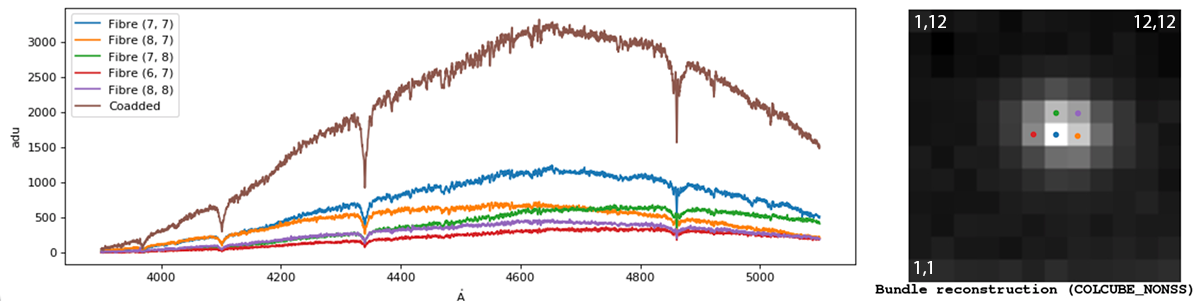
Selecting five fibres by eye from the COLCUBE IFU reconstruction image and coadding those selected fibres. Note how much the individual fibres differ due to differential atmospheric refraction. In order to obtain accuate spectrophotometry, all fibres that contain flux would need to be combined.
    import numpy as np
    from astropy.io import fits
    from astropy import units as u
    from matplotlib import pyplot as plt
    from astropy.visualization import quantity_support
    import astropy.wcs as fitswcs
    import specutils as sp
    quantity_support()

    # Read the FITS extension 4[CUBE_SS]
    f = fits.open("FILENAME.FITS")
    specarray = f[4].data
    specheader = f[4].header
    specheader['CUNIT3'] = 'Angstrom'
    my_wcs = fitswcs.WCS(specheader)
    f.close()

    # Select the fibres to plot from FITS extension 7[COLCUBE]
    # Pixel coordinates following the typical FITS convention of a
    # raster-scan from bottom-left to top-right
    #   1,1  is bottom-left pixel in the COLCUBE image
    #   12,1 is bottom-right pixel
    #   1,12 is top-left pixel
    # In contrast, fibres map from IFU to their sequence on the slit
    # in boustrophedon manner from bottom-left to top-right.
    fibresToPlot = [(7,7),(8,7),(7,8),(6,7),(8,8)]
    countToPlot = len(fibresToPlot)

    # Retain just the listed fibres to plot.
    dataToPlot = np.zeros((countToPlot,specarray.shape[0]))
    for ii in range(0, countToPlot) :
      dataToPlot[ii,:] = specarray[:,fibresToPlot[ii][1]-1,fibresToPlot[ii][0]-1]

    # Create a Spectrum1D object containing the five separate fibres
    dataToPlot = dataToPlot * u.Unit("adu")
    sp1d = sp.Spectrum1D(flux=dataToPlot,wcs=my_wcs)

    fig = plt.figure(figsize=(12, 4), dpi=80, facecolor='w', edgecolor='k')
    ax = plt.axes()
    for ii in range(0, countToPlot):
      plt.plot(sp1d.spectral_axis,sp1d.flux[ii],label='Fibre '+str(fibresToPlot[ii]))

    # Coadd the five fibres into one total and plot the result
    sp1d = sp.Spectrum1D( flux=np.nansum(dataToPlot,axis=0), wcs=my_wcs)
    plt.plot(sp1d.spectral_axis, sp1d.flux, label='Coadded')
    plt.legend()
    plt.show()
Again a small python script (frodo_splot_cube.py) that uses the above method to plot a spectrum is available. It is only a minimal demonstration and not a full plotting application. Assuming you already have all the Python dependencies installed, it may be run:
    python frodo_splot_cube.py r_e_20190905_7_1_0_2.fits "(7,7),(8,7),(7,8),(6,7),(8,8)"
    python frodo_splot_cube.py -h          # to get syntax help
Finally, this example uses the linearized, sky-subtracted, 2D spectral stack FITS extension 3[RSS_SS].
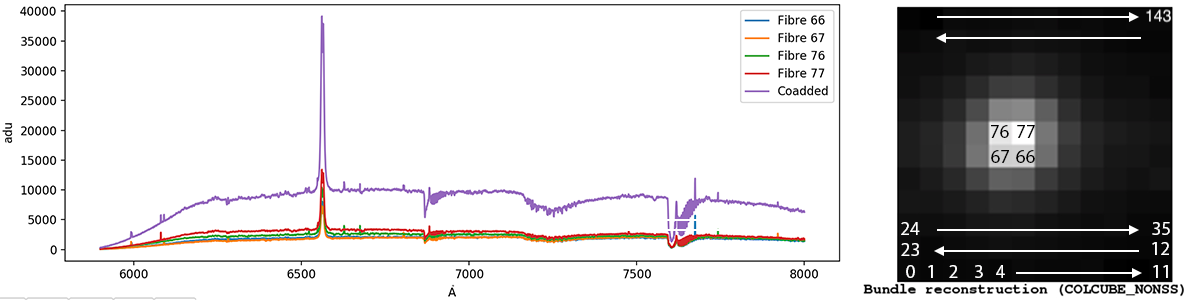
Selecting four fibres by eye from the RSS FITS extension and coadding those selected fibres. Cosmic rays have not been filtered and are visible in the final stack
    import numpy as np
    from astropy.io import fits
    from astropy import units as u
    from matplotlib import pyplot as plt
    from astropy.visualization import quantity_support
    import astropy.wcs as fitswcs
    import specutils as sp
    quantity_support()

    # Read the FITS extension 3[RSS_SS]
    f = fits.open("FILENAME.FITS")
    specarray = f[3].data
    specheader = f[3].header
    specheader['CUNIT1'] = 'Angstrom'
    my_wcs = fitswcs.WCS(specheader)
    f.close()

    # Select the fibres to plot, counting up from the bottom of the RSS_SS
    # extension, starting from fibre 0, so the top row of image is fibre 143.
    #
    # To map from the COLCUBE image to position on the slit, start from the
    # bottom-left IFU pixel being fibre 0 and following a boustrophedon scan
    # to end with the top-right IFU pixel as 143.
    fibresToPlot = [66,67,76,77]
    countToPlot = len(fibresToPlot)
    mask = np.zeros(144, dtype=bool)
    mask.put(fibresToPlot,True)

    # Retain just the listed fibres to plot.
    dataToPlot = specarray[mask] * u.Unit("adu")

    # Create a Spectrum1D object containing the four separate fibres
    sp1d = sp.Spectrum1D(flux=dataToPlot, wcs=my_wcs)

    fig = plt.figure(figsize=(12, 4), dpi=80, facecolor='w', edgecolor='k')
    ax = plt.axes()
    for ii in range(0, countToPlot):
     plt.plot(sp1d.spectral_axis,sp1d.flux[ii],label='Fibre '+str(fibresToPlot[ii]))

    # Coadd the four fibres into one total and plot the result
    dataToPlot = np.sum(specarray[mask],axis=0) * u.Unit("adu")
    sp1d = sp.Spectrum1D(flux=dataToPlot,wcs=my_wcs)
    plt.plot(sp1d.spectral_axis,sp1d.flux,label='Coadded')
    plt.legend()
    plt.show()
Extraction using the Starlink software
Starlink users may extract the appropriate extension using the CONVERT:FITS2NDF command, appending the filename with the extension they wish to extract in brackets. The result is a single extension .SDF file.
For example, to extract the raw image from the multipart FITS file r_e_20100311_1_1_1_2.fits use:
  > convert
  > fits2ndf "r_e_20100311_1_1_1_2.fits[0]"
Or alternatively, you can access the required HDU by using the corresponding EXTNAME key:
> fits2ndf "r_e_20100311_1_1_1_2.fits[L1_IMAGE]"
Extraction using DS9
DS9 users may view the available extensions by adding -multiframe on the terminal command line:
> ds9 -multiframe r_e_20100311_1_1_1_2.fits
A frame extraction can be achieved by adding the -frame and -savetofits parameters, specifying the frame to be extracted (frame 1 corresponds to the primary HDU):
> ds9 -multiframe r_e_20100311_1_1_1_2.fits -frame 1 -savefits output.fits -quit
Wavelength Calibration
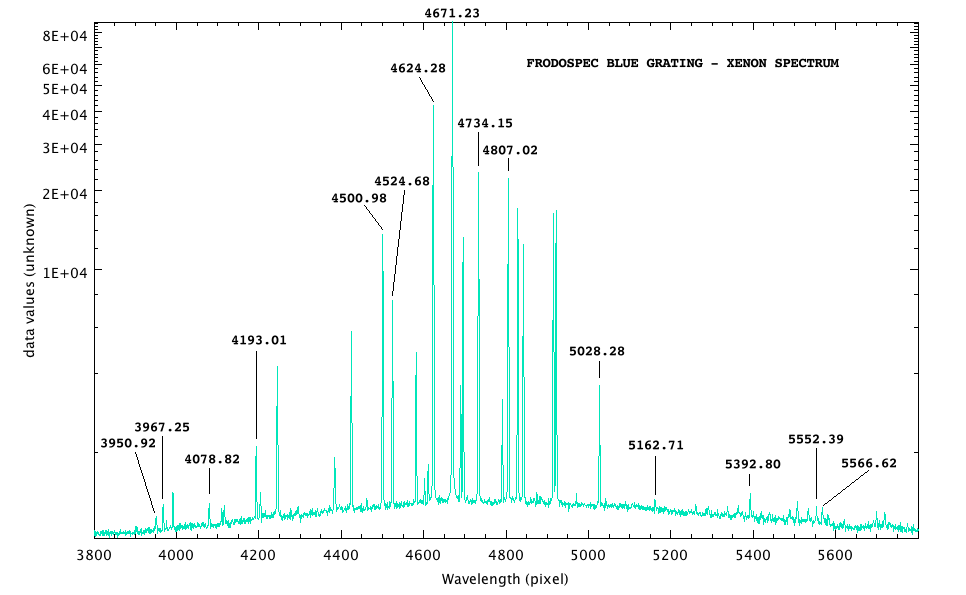
Xenon arc in FRODOspec blue grating ( bigger version (10.4kB))
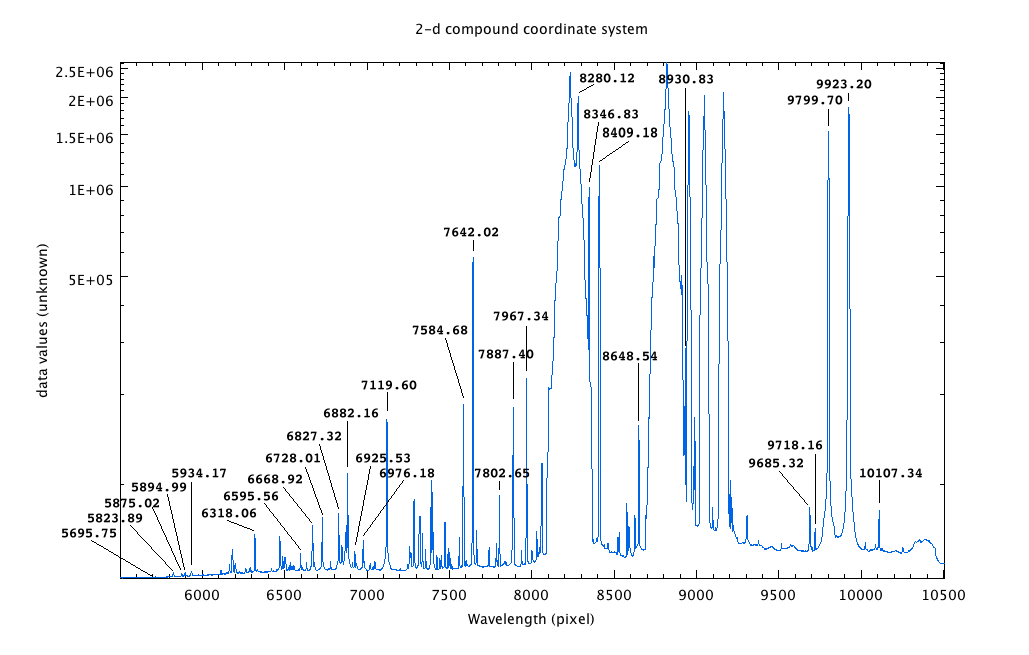
Xenon arc in FRODOspec red grating ( bigger version (10.4kB))
FRODOspec contains two different calibration light sources that perform different functions:
- a xenon arc lamp is used for wavelength calibration
- a tungsten continuum lamp is used for fibre tracing, to calibrate the built-in spatial distortion in the system
Use of the lamps is not compulsory, but it is recommended because at present we do not know the long-term stability of the FRODOspec system. We therefore recommend a Xenon arc exposure is obtained every time the gratings are moved.
Movement of the grating plus arc and science exposures must be made in the correct sequence, not only to obtain correct calibration, but also to avoid the risk of the arc light causing loss of the guide star. The sequence should be:
- select grating
- obtain science data
- obtain xenon arc exposure
Although simultaneous observations of science or arcs in both red & blue arms are possible, it is NOT possible to take an arc in one arm while obtaining science data in the other. This is governed by the robotic control system, which if necessary will wait for science observing to finish in one arm before beginning an arc calibration in the other. This must be borne in mind both when calculating telescope time in phase 1 proposals and when scheduling observations in the phase 2.
All FRODOSpec data are flat-fielded and a sky-subtracted spectrum is created by the pipeline (and included in the reduced multi-extension FITS file) as described above. However, at the present time we do not apply any sort of flux calibration or telluric correction to pipeline-processed data. Users may therefore wish to add a standard star observation to their FRODOSpec observing sequence so that their calibration observations are matched in time and airmass with the science data; see the SPRAT Phase2 guidelines for details on how to do this using the Sequence Builder; the sequence of observations and configurations would be essentially the same for the two instruments. Links to tables of spectro-photometric standard stars are provided by ESO here.
RISE
All RISE data are run through a modified version of the IO:O data pipeline on the morning after the data was taken. The pipeline debiases, removes a scaled dark frame, and flat-fields the data using a library flat which is updated every few months. The original V+R visible band filter caused no detector fringing. The near-IR filter does show weak fringing however no automated fringe subtraction is currently being applied by the pipline. An automated email is sent when reduced data are available for download.
SkyCam pipeline
When the enclosure is open, a 10 sec exposure is taken automatically once per minute with Skycam-T and Skycam-Z. Skycam-A uses 30sec. Skycam-O runs day and night, whether or not the dome is open, and adjusts its exposure time dynamically, depending on the light level. All data are automatically dark subtracted and flat-fielded and a world coordinate system fitted. Skycam-Z data remain proprietary. However, SkyCam-A, Skycam-O and SkyCam-T data are then immediately released, both as JPEG and FITS files here. In addition both browsable ( 2026; 2025; 2024; etc) and searchable image archives are available.